
Novosoft Office Backup3.3.7 - Download
You'll be able to download in few seconds.
Publisher Description
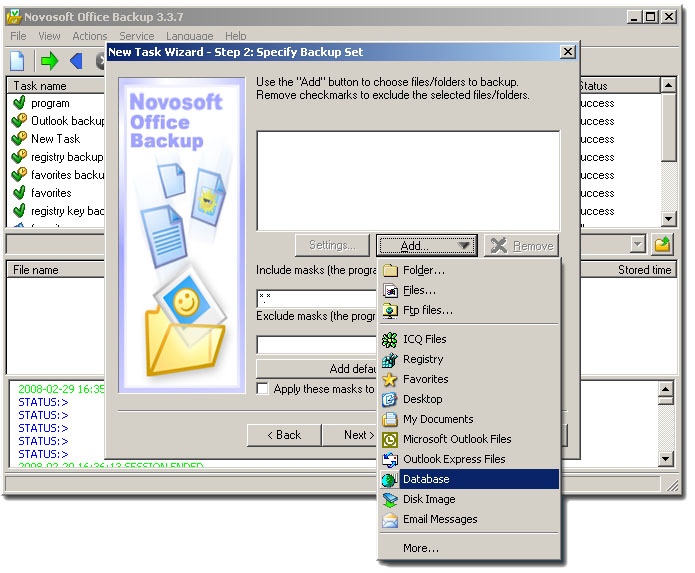
Novosoft Office Backup is a comprehensive backup solution with a simple and intuitive interface which allows doing backup of data under Windows 2000/XP/2003/Vista with 9 levels of Zip compression and 128-bit blowfish encryption to virtually any storage media including CD, DVD, HD-DVD, Blu-ray, USB, flash, FTP, SFTP, LAN and network drives. Novosoft Office Backup supports direct mail backup from mail server via POP3. The program can do easy backup of My Documents, MS Outlook/Outlook Express, ICQ, Registry, Desktop items. More plug-ins are available for download from the program web site such as plug-ins for backup of ASDSee, Adobe Photoshop CS2, Firefox, the Bat Pro, AOL Instant Messenger, Spybot - Search Destroy, Winamp, Windows Media Player, WinRar, WinZip, Yahoo messenger. In addition, you can apply file filters to select only the most critical data, and perform backups automatically on a flexible schedule with a minute accuracy or manually launch a backup task at any moment. It is also possible to schedule backups for execution upon system logon or logoff or before/after execution of any program. Two backup modes such as Standard mode and Expert mode allow for simpler or more specific adjustment of the backup task including backup with timestamps and versions to keep track of all file modifications and restore data files to a state in which they were at a specific point in time. Besides, Novosoft Office Backup supports one-way and two-way (mirroring) synchronization with which you can easily synchronize all of your important data files across multiple computers and devices. The option of running tasks as Windows service allows two or more users to do backup simultaneously even with no user logged on. While backup runs invisibly not interfering with other programs, the user is informed about its progress through email notifications and tray icon signals, as well as through a log file.
About Novosoft Office Backup
This Backup & Restore program is available in English, Chinese, Czech, French, German, Italian, Korean, Norwegian, Russian, Spanish, Swedish. It was last updated on 29 September, 2026. Novosoft Office Backup is compatible with the following operating systems: Windows.
The company that develops Novosoft Office Backup is Novosoft LLC. The latest version released by its developer is 3.3.7.
The download we have available for Novosoft Office Backup has a file size of 10.5 MB. Just click the green Download button above to start the downloading process. The program is listed on our website since 2008-05-04 and was downloaded 0 times. We have already checked if the download link is safe, however for your own protection we recommend that you scan the downloaded software with your antivirus. Your antivirus may detect the Novosoft Office Backup as malware if the download link is broken.
How to install Novosoft Office Backup on your Windows device:
- Click on the Download button on our website. This will start the download from the website of the developer.
- Once the Novosoft Office Backup is downloaded click on it to start the setup process (assuming you are on a desktop computer).
- When the installation is finished you should be able to see and run the program.
Program Details
General
System requirements
Download information
Pricing
Version History
version 3.3.7
posted on 2008-05-04
some bugs were fixed
version 3.1.2.1
posted on 2007-05-11
The program is now more compatible with Windows Vista and provides improved DVD, HD DVD, Blu-ray burning engine, extended service opportunities, fixed archiving engine for a large amount of files, new opportunities with work with log file and more.
Disclaimer
External Download
We do not host Novosoft Office Backup on our servers. We did not scan it for viruses, adware, spyware or other type of malware. This app is hosted by the software publisher and passed their terms and conditions to be listed there. We recommend caution when installing it.
The external download link for Novosoft Office Backup is provided to you by apps112.com without any warranties, representations or guarantees of any kind, so access it at your own risk.
If you have questions regarding this particular app contact the publisher directly. For questions about the functionalities of apps112.com contact us.
